TL;DR: BuildKit bind mounts don’t enter the Docker layer cache key, so vLLM’s nightly images kept installing a stale, pre-fix wheel for over two weeks — even though the source and the build stage were both correct. The fix: invalidate the install layer on a SHA-256 checksum of the wheel instead of the wheel’s contents itself, so the cache busts correctly without the wheel ever entering the image.
“The code was correct. The build was green. Yet every nightly Docker image crashed.”
That’s the kind of bug that immediately grabs an engineer’s attention.
Recently, while contributing to vLLM, I came across a seemingly simple issue that turned into an interesting lesson about Docker, BuildKit, and why understanding build systems matters just as much as understanding application code.
This is the story of how I tracked it down — PR #44795 (merged June 14, 2026), fixing issue #44759.
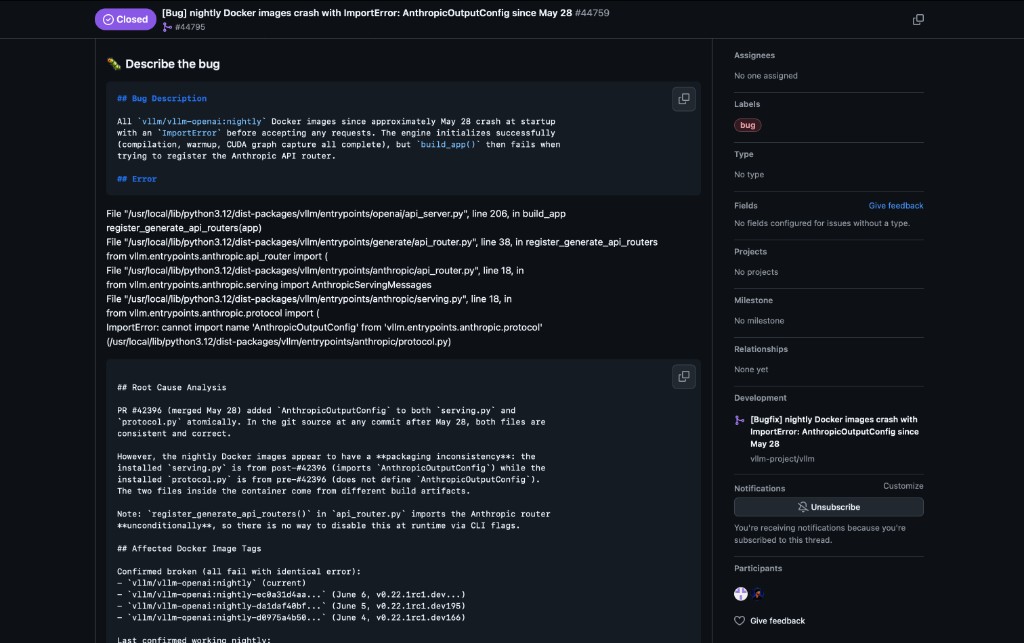
ImportError: AnthropicOutputConfig even though source on main looked correct.The bug
The issue looked straightforward.
Every newly built nightly Docker image failed immediately with:
ImportError: cannot import name 'AnthropicOutputConfig'
  from 'vllm.entrypoints.anthropic.protocol'
The full traceback showed the engine initialized successfully — compilation, warmup, CUDA graph capture — and then build_app() failed when registering the Anthropic API router:
File ".../vllm/entrypoints/openai/api_server.py", line 206, in build_app
    register_generate_api_routers(app)
File ".../vllm/entrypoints/generate/api_router.py", line 38, in register_generate_api_routers
    from vllm.entrypoints.anthropic.api_router import (
File ".../vllm/entrypoints/anthropic/serving.py", line 18, in <module>
    from vllm.entrypoints.anthropic.protocol import (
ImportError: cannot import name 'AnthropicOutputConfig'
At first glance, this suggested that AnthropicOutputConfig simply didn’t exist.
Except… it did.
Opening the repository showed that both protocol.py and serving.py already contained the required changes — updated together in PR #42396 (merged May 28). Everything looked perfectly synchronized.
So why was the Docker image behaving as if the code hadn’t been updated?

That question became the starting point of the investigation.
Looking beyond the source code
When debugging, it’s tempting to focus only on the application code.
But software doesn’t magically become a Docker image. There is an entire pipeline in between:
Source Code
      ↓
Build Wheel
      ↓
Install Wheel
      ↓
Create Docker Image
Somewhere in this pipeline, something was going wrong.
If the source code was correct, perhaps the wrong version of the package was actually being installed. That shifted the investigation away from Python and toward Docker itself.
Following the trail
The Dockerfile used BuildKit’s bind mounts while installing the wheel. Conceptually:
RUN --mount=type=bind,from=build,src=/workspace/dist,target=/vllm-workspace/dist \
    --mount=type=cache,target=/opt/uv/cache \
    uv pip install dist/*.whl
At first, nothing seemed suspicious. The build stage generated a fresh wheel. The installation stage installed that wheel. Everything looked perfectly reasonable.
Until I looked closer at how Docker caching actually works.
The real culprit
Docker aggressively caches build layers to speed up future builds.
Normally, if an input changes, Docker knows it needs to rerun that layer. But BuildKit bind mounts behave differently: the contents of a bind mount do not participate in the cache key.
That means Docker only saw this:
“This RUN instruction hasn’t changed.”
It didn’t notice that the wheel being mounted into that command had changed.
This isn’t a BuildKit bug — it’s working as designed. COPY hashes the content of whatever it copies into the instruction’s cache key, because those bytes are about to become part of the image, and BuildKit needs a way to know if the image’s contents changed. A --mount=type=bind mount is built for the opposite case: giving a RUN step access to files that are explicitly not meant to end up in the image — a local package registry during compilation, say. Since that content was never going to persist, BuildKit doesn’t fingerprint it; the cache key for the RUN instruction is just the instruction text (uv pip install dist/*.whl), which hadn’t changed. The mechanism did exactly what it was built to do. The problem was using a “don’t persist this” primitive as the only way to deliver a new package version into a step with a real, externally observable side effect — an installed Python package.
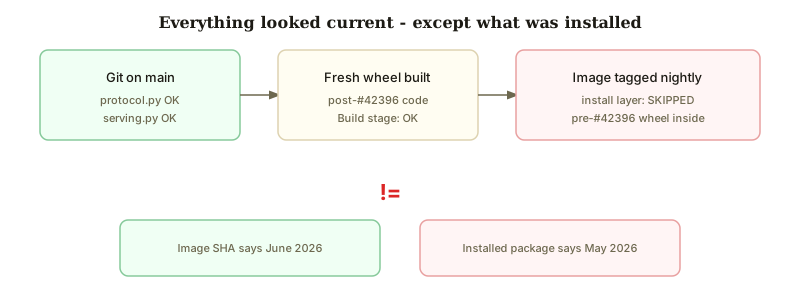
On machines with a warm cache (like Buildkite agents running nightly builds), Docker happily skipped the installation step and reused an older installed wheel.
The result was surprisingly confusing:
- The repository contained the newest code.
- The wheel had been rebuilt.
- The Docker image still contained the previous version.
Everything appeared current except the installed package itself. That perfectly explained why the image referenced classes that no longer existed.
My first fix
My initial solution seemed obvious: instead of mounting the wheel, copy it into the image before installation.
COPY --from=build /workspace/dist/*.whl /tmp/
RUN uv pip install /tmp/*.whl
Now the wheel became part of Docker’s cache key. Whenever the wheel changed, Docker would correctly rerun the installation layer.
Problem solved.
Or so I thought.
Code review made it better
During review, Harry-Chen pointed out something I had overlooked:
This file will be in the image forever even if you deleted it in later steps. Is there any other way that does not incur such overhead as well as avoids this caching problem?
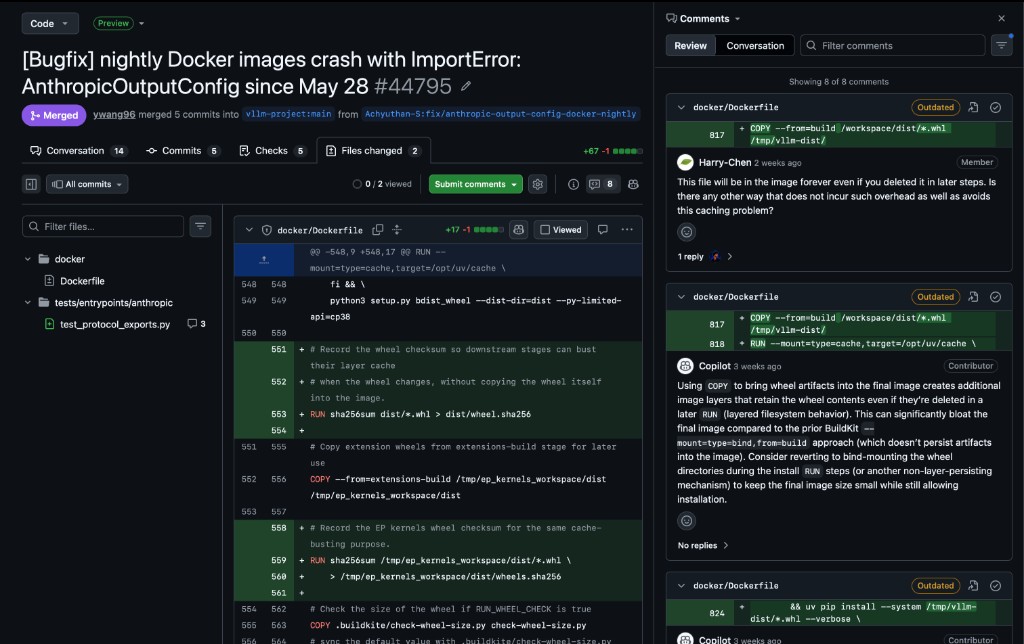
Docker images are layer-based. Even if you delete a copied file later:
COPY wheel.whl /tmp/
RUN uv pip install /tmp/wheel.whl
RUN rm /tmp/wheel.whl
…the wheel still exists in an earlier image layer. The image permanently grows larger.
My solution fixed the caching bug — but introduced unnecessary image bloat. It was a valuable reminder that solving the immediate problem isn’t always enough. Good engineering considers long-term trade-offs too.
A better solution
Instead of copying the entire wheel into the image, I copied something much smaller: its SHA-256 checksum.
The build stage generates a checksum file every time a wheel is built:
# In the build stage — record wheel checksum
RUN sha256sum dist/*.whl > dist/wheel.sha256
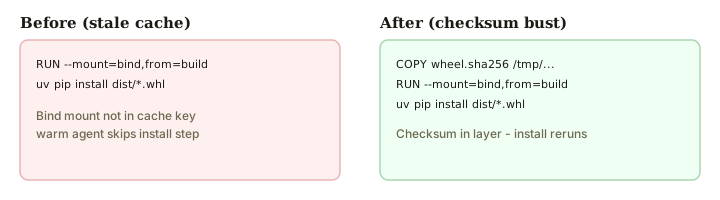
The installation stage copies only that checksum (a few hundred bytes), then installs via the original bind mount:
# Copy only the checksum so a wheel change invalidates this layer.
# The wheel itself is bind-mounted below and never enters the image.
COPY --from=build /workspace/dist/wheel.sha256 /tmp/vllm-wheel.sha256
RUN --mount=type=bind,from=build,src=/workspace/dist,target=/vllm-workspace/dist \
    --mount=type=cache,target=/opt/uv/cache \
    uv pip install dist/*.whl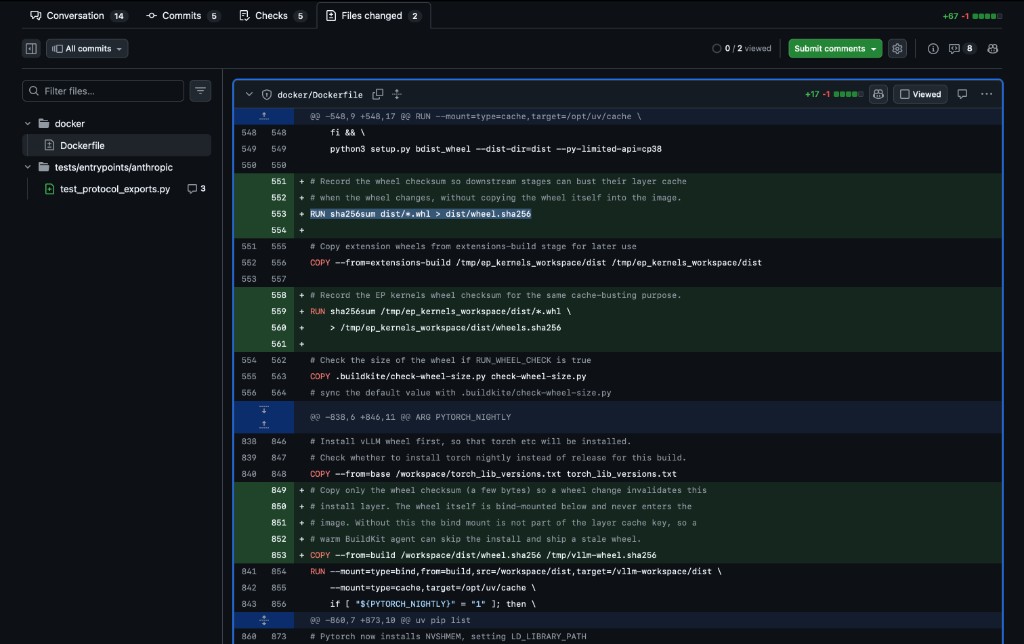
wheel.sha256 in the build stage, checksum copied into the install layer, wheel still bind-mounted.Because the checksum changes whenever the wheel changes, Docker correctly invalidates the cache. Meanwhile, the actual wheel continues to be installed through the bind mount — never persisted as an image layer.
This achieved both goals:
- Cache invalidation works correctly.
- The wheel never becomes part of the Docker image.
Tiny file. Correct cache behavior. No image size penalty.
Sometimes the best fix isn’t adding more — it is adding almost nothing.
The same pattern was applied for EP kernels wheels (wheels.sha256).
One more thing: a regression test
I also added a no-GPU regression test so this class of breakage gets caught before it ships:
# tests/entrypoints/anthropic/test_protocol_exports.py
"""Guards against Docker/nightly images shipping a stale protocol module
missing symbols imported by serving (issue #44759)."""

from vllm.entrypoints.anthropic.protocol import (
    AnthropicContentBlock,
    AnthropicContextManagement,
    AnthropicCountTokensRequest,
    AnthropicCountTokensResponse,
    AnthropicDelta,
    AnthropicError,
    AnthropicMessagesRequest,
    AnthropicMessagesResponse,
    AnthropicOutputConfig,
    AnthropicStreamEvent,
    AnthropicUsage,
)

SERVING_PROTOCOL_EXPORTS = (
    AnthropicContentBlock,
    AnthropicContextManagement,
    # ... all 11 symbols serving.py imports ...
    AnthropicOutputConfig,
    AnthropicStreamEvent,
    AnthropicUsage,
)

def test_serving_protocol_exports_are_importable():
    for export in SERVING_PROTOCOL_EXPORTS:
        assert export is not None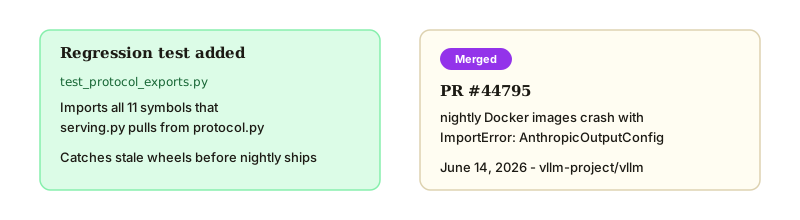
The original failure wasn’t caught during CI because nothing verified that all symbols expected by the Anthropic serving implementation could actually be imported.
Fixing bugs is good. Making sure they never come back is even better.
What this taught me
This pull request wasn’t really about Docker. It was about debugging.
It reminded me that software bugs often hide in the spaces between systems:
| Layer | Status |
|---|---|
Python source on main |
Correct |
| Wheel built in CI | Correct |
| Docker build log | Green |
| Installed package in image | Stale |
Understanding how those pieces interact was the real challenge.
It also reinforced something about how good code review actually works. Maintainers aren’t just checking whether code runs — they’re checking whether it’s the right shape of fix. Harry-Chen’s one-line question is the difference between a PR that closes an issue and one that quietly creates a new problem (ballooning image size) six months later.
Links
- PR #44795 — nightly Docker images crash with ImportError
- Issue #44759 — bug report with full traceback
- PR #42396 — original AnthropicOutputConfig change
Final thoughts
When people think about debugging, they often imagine stepping through application code.
But sometimes the most interesting bugs have nothing to do with the application itself. Sometimes they’re hiding inside your build system.
And sometimes, fixing them teaches you more than writing an entirely new feature ever could.